
Monica v8 is here: Explore the latest updates
On 26 August 2026, after more than a year of development, we released Monica M&C 8.0.0.
This major release introduces a number of new capabilities and improvements across the platform, including a unified Action model, the new Workflow module, enhanced alarm and logging capabilities, topology and scheduling improvements, deployment automation, UI updates, and performance work.
As with every major release, version 8.0.0 includes some breaking changes. Backward compatibility has nevertheless been preserved wherever practical to help existing deployments and integrations transition smoothly. This release continues the evolution of Monica M&C as a modular platform for monitoring, control, automation, configuration management, and operational analysis.
Table of contents
- Actions
- Workflow module
- Alarms, Logs and TSDB
- Topology
- Scheduler and Orbit module
- Deployment automation
- UI improvements
- Driver improvements
- Tech stack
- Performance improvements
- New dashboard widgets
- Other improvements
- Road ahead
- Get in touch
Actions
Actions are a new core concept in Monica M&C. An Action represents a discrete unit of work that can be executed by the system: an operation that previously might have been initiated from the graphical user interface, through the REST API, from a script, by the scheduler, or as a response to an alarm.
By bringing these operations under a single abstraction, Monica now provides a consistent interface for defining, discovering, executing, and auditing operational work across all of its consumers.
The existing dedicated REST endpoints remain available for backward compatibility and for integrations that benefit from purpose-specific APIs. In addition, Monica 8 introduces a generic ExecuteAction endpoint. It accepts an Action definition as JSON and returns an Action Execution object, following a model comparable to Script Execution. This provides a uniform programmatic entry point for clients that need to invoke actions dynamically.
Action catalogue
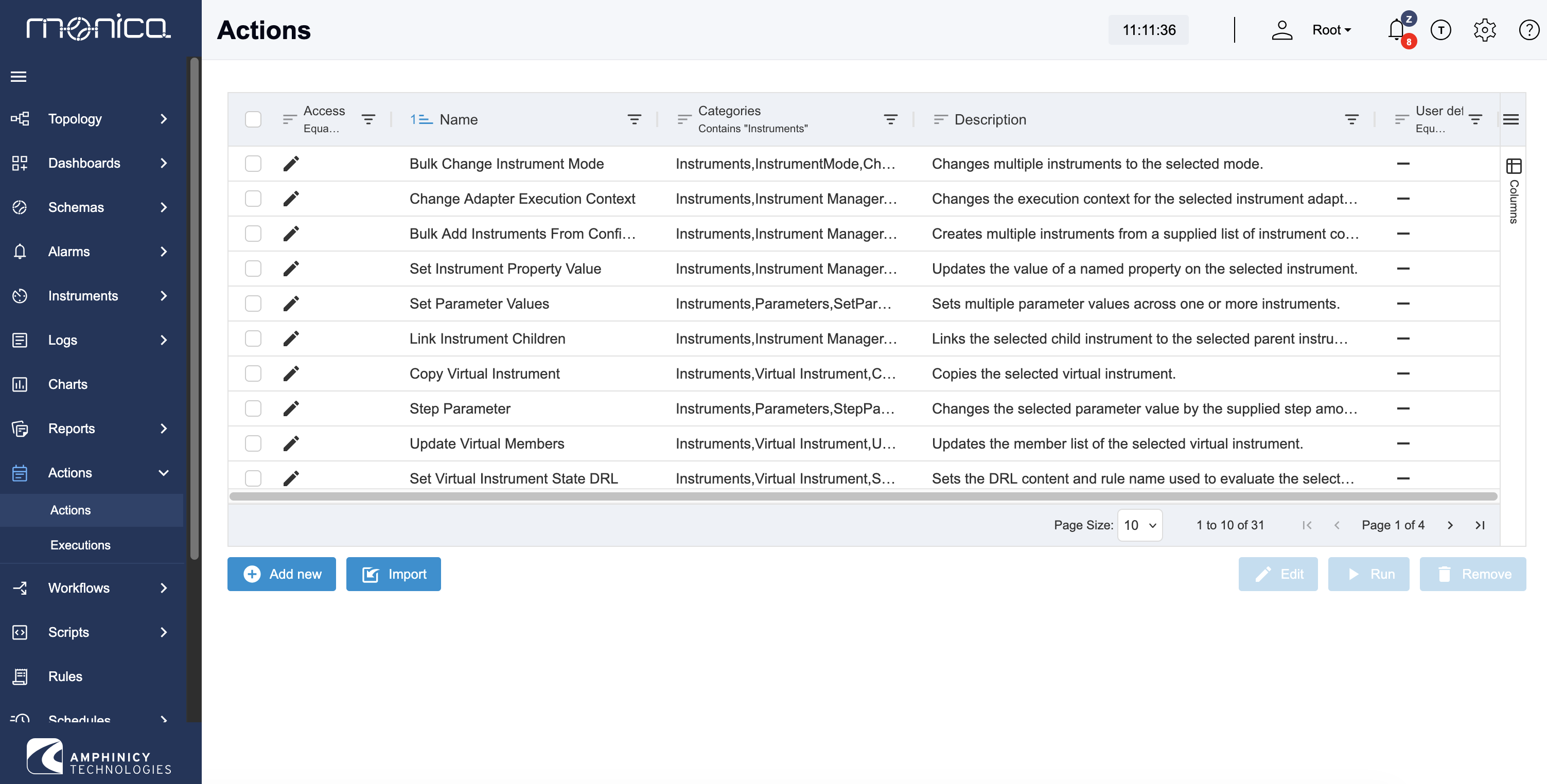
Monica 8 includes more than 100 predefined Actions. They are organised by module, resource, and action type, making the catalogue easier to navigate and extend.
Examples include:
- Set Parameter Value
- Start Script
- Change Instrument Mode
The framework is designed for both human-operated and automated use cases. The same Action can be invoked interactively by an operator, requested through an API integration, launched by a script, scheduled for later execution, or triggered by an alarm or workflow.
Scheduler and alarms
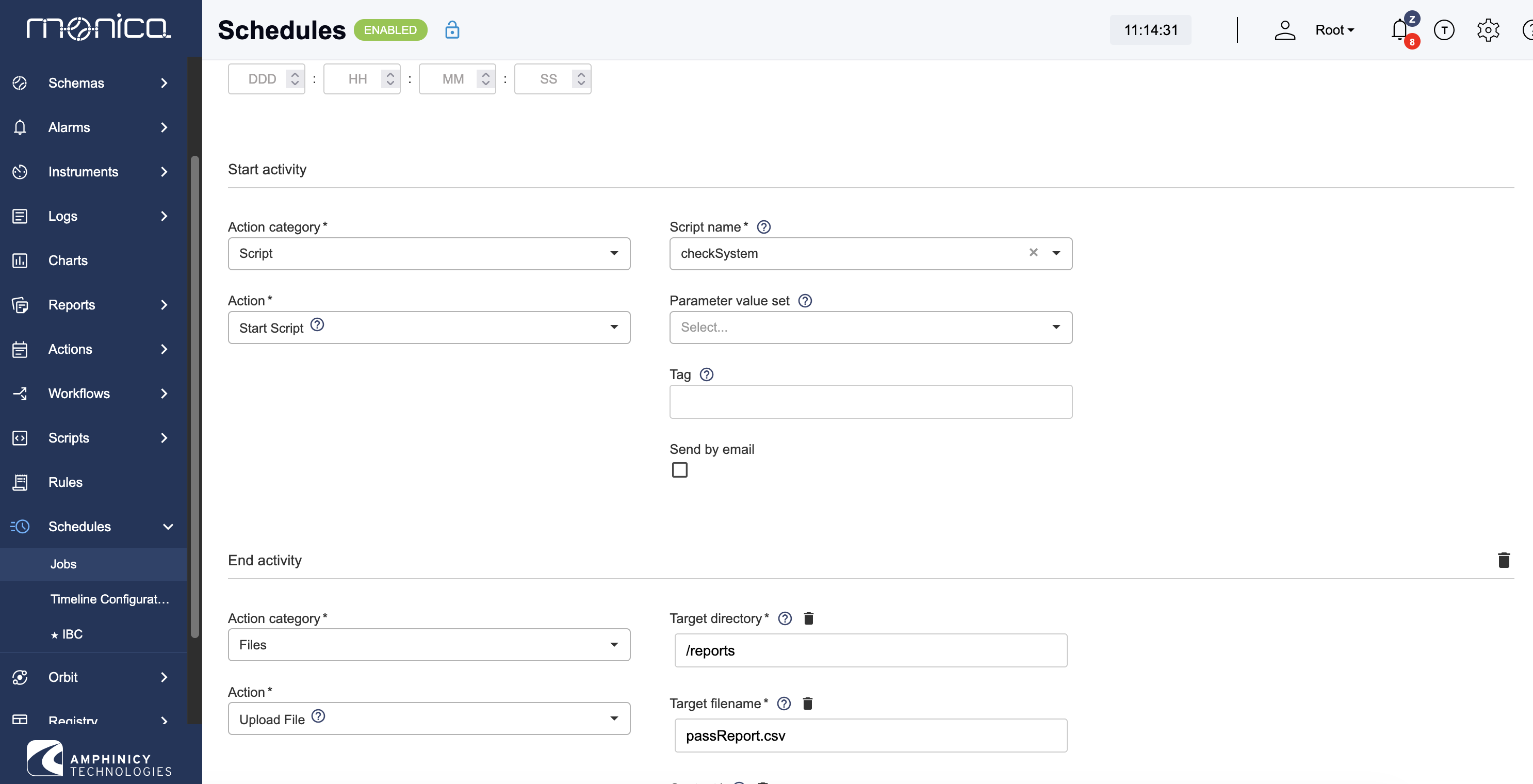
The Scheduler and Alarm Actions capabilities have been rewritten on top of the Action framework.
Previously, these features exposed only a small, fixed selection of operation types - typically two to five actions. They can now invoke the full Action catalogue, immediately increasing the range of automated operational responses from a handful of predefined operations to more than 100 available Actions.
This provides a consistent automation model across scheduled operations, alarm responses, scripts, workflows, API clients, and the user interface.
Extensibility
The Action component includes a registration mechanism that enables Monica modules to contribute their own Actions.
As a result, new operational capabilities can be introduced without modifying the core Action framework. A module simply defines and registers its Actions, after which they become available to supported consumers such as the GUI, REST API, Scheduler, Alarm Actions, and Workflow.
This also creates a clear integration path for third-party modules: external extensions can register their own Actions without requiring changes to Monica core. The catalogue can therefore grow alongside the system while retaining a consistent execution model.
Auditing and traceability
Actions also establish a standardised audit trail for operational activity.
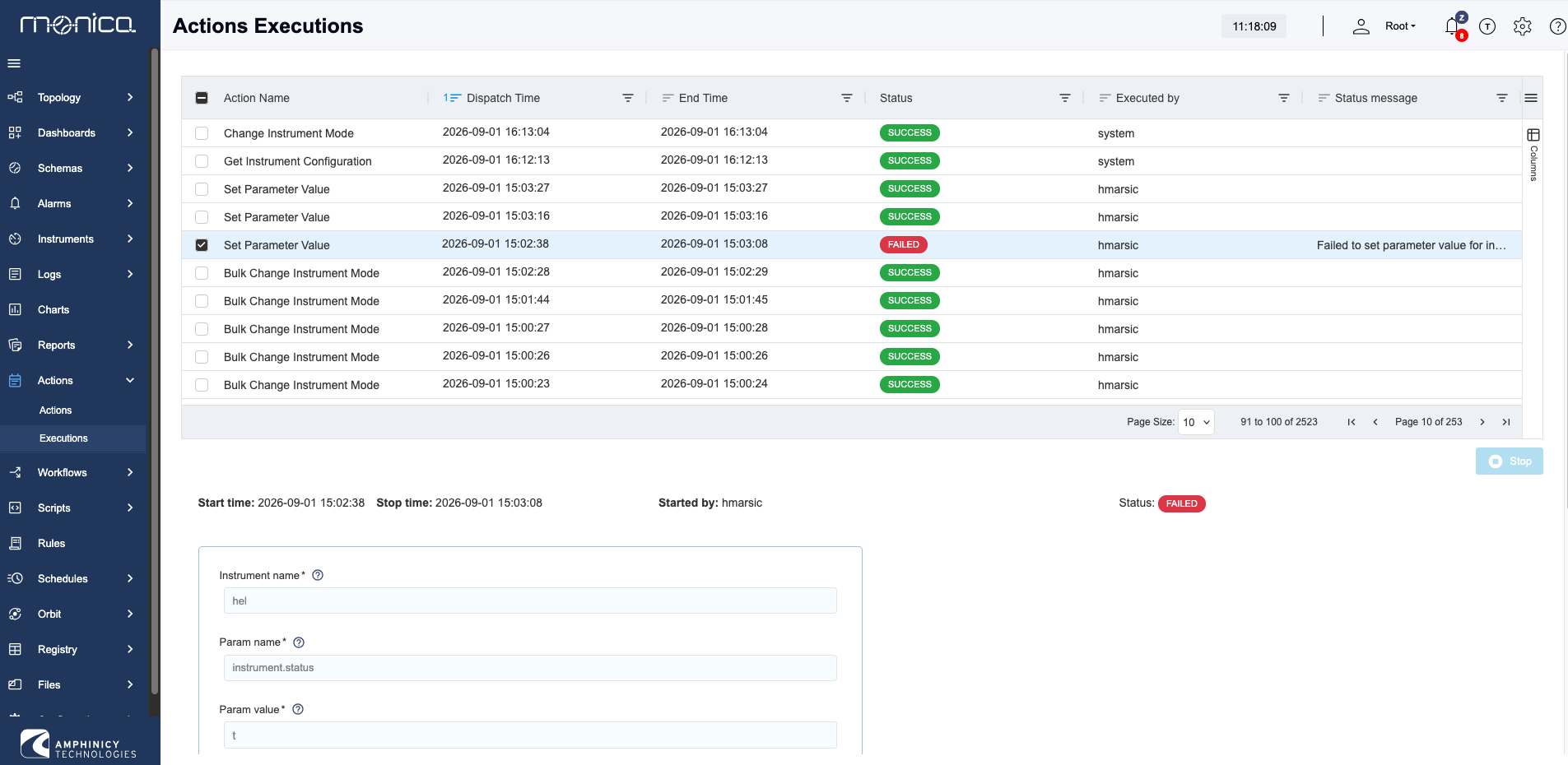
Every Action execution produces Event Log entries for its start and completion, as well as for significant intermediate steps. This creates a consistent and traceable record regardless of whether the Action was initiated manually, through an API call, by a schedule, as an alarm response, or from a workflow.
For operators and administrators, this improves visibility into what was executed, when it was executed, how it progressed, and what outcome it produced. It also establishes a common foundation for operational auditing, troubleshooting, and security analysis.
Workflow module
The Workflow module is a new optional Monica M&C module, currently available as a limited feature-set technical preview. We welcome your feedback to help us refine and improve the functionality before GA. It is being developed within the ESA PECS project Integrated Test and Workflow Platform for OGS and QKD Systems.
The module will provide a unified environment for automation and orchestration of operational procedures. Monica M&C already includes lower-level automation mechanisms such as scripts, the Rule Engine, and the Scheduler. These remain appropriate for focused tasks, while the Workflow module addresses procedures that require multiple operations, conditional logic, variables, loops, and execution monitoring to be managed as a single process.
The module includes a workflow engine developed specifically for the Monica M&C domain. It provides capabilities comparable to BPM and general-purpose workflow engines, but is implemented as an integrated Monica component rather than by embedding an external engine. This allows direct use of Monica’s existing data model, business logic, security model, and execution infrastructure, with lower integration overhead.
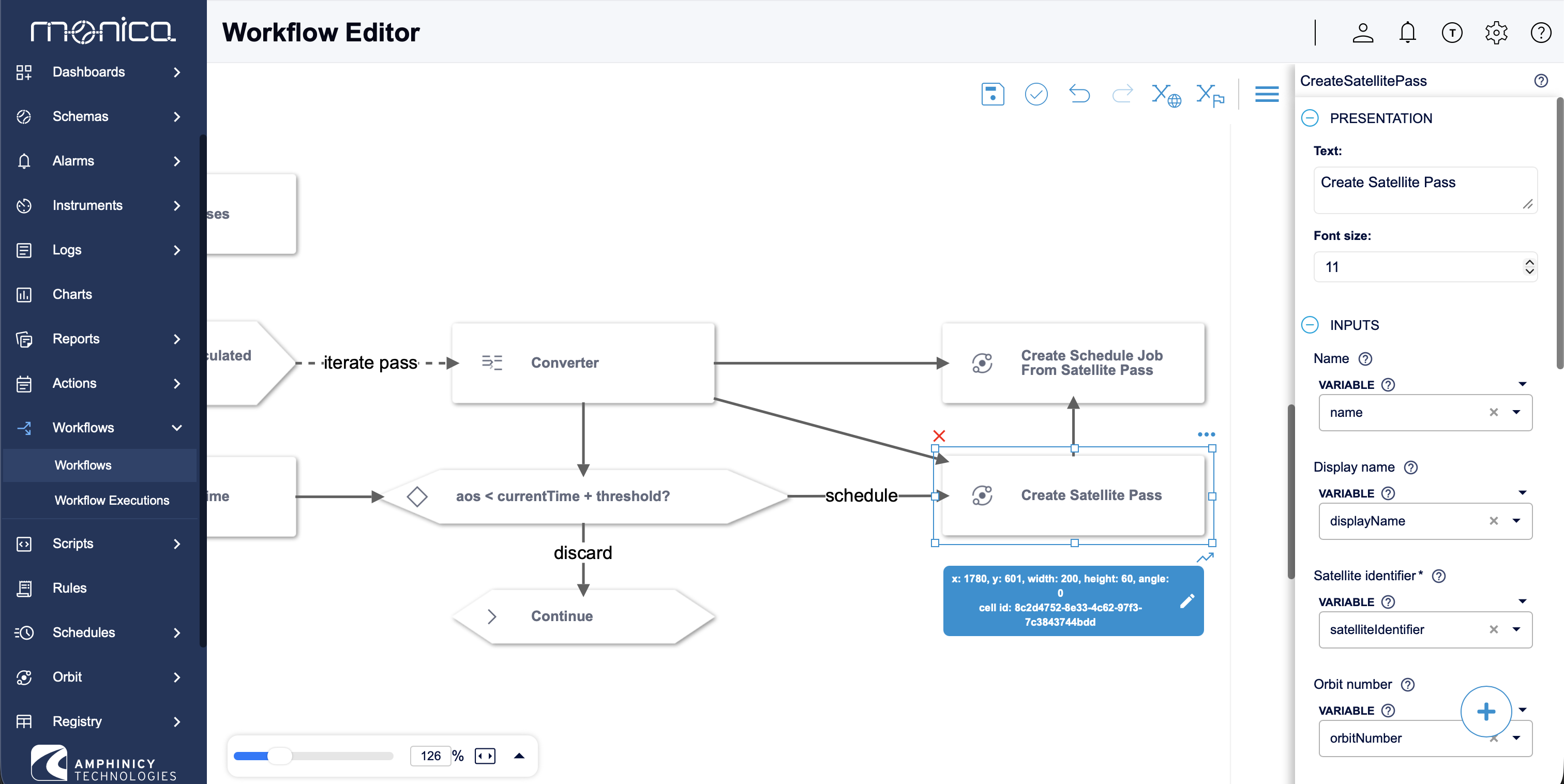
Workflows build on the Action framework introduced in Monica 8. Any Action can be used as a workflow step, allowing workflows to invoke the same operations available through the GUI, REST API, scripts, Scheduler, Alarm Actions, and other consumers. The workflow model also includes dedicated steps for conditions, branching, loops, variables, and execution control.
For example, a workflow can validate an instrument state, configure parameters, start supporting scripts, wait for required conditions, and then change the instrument mode. Each operation remains an individually traceable Action, while the workflow defines the sequence, decision logic, and shared execution context.
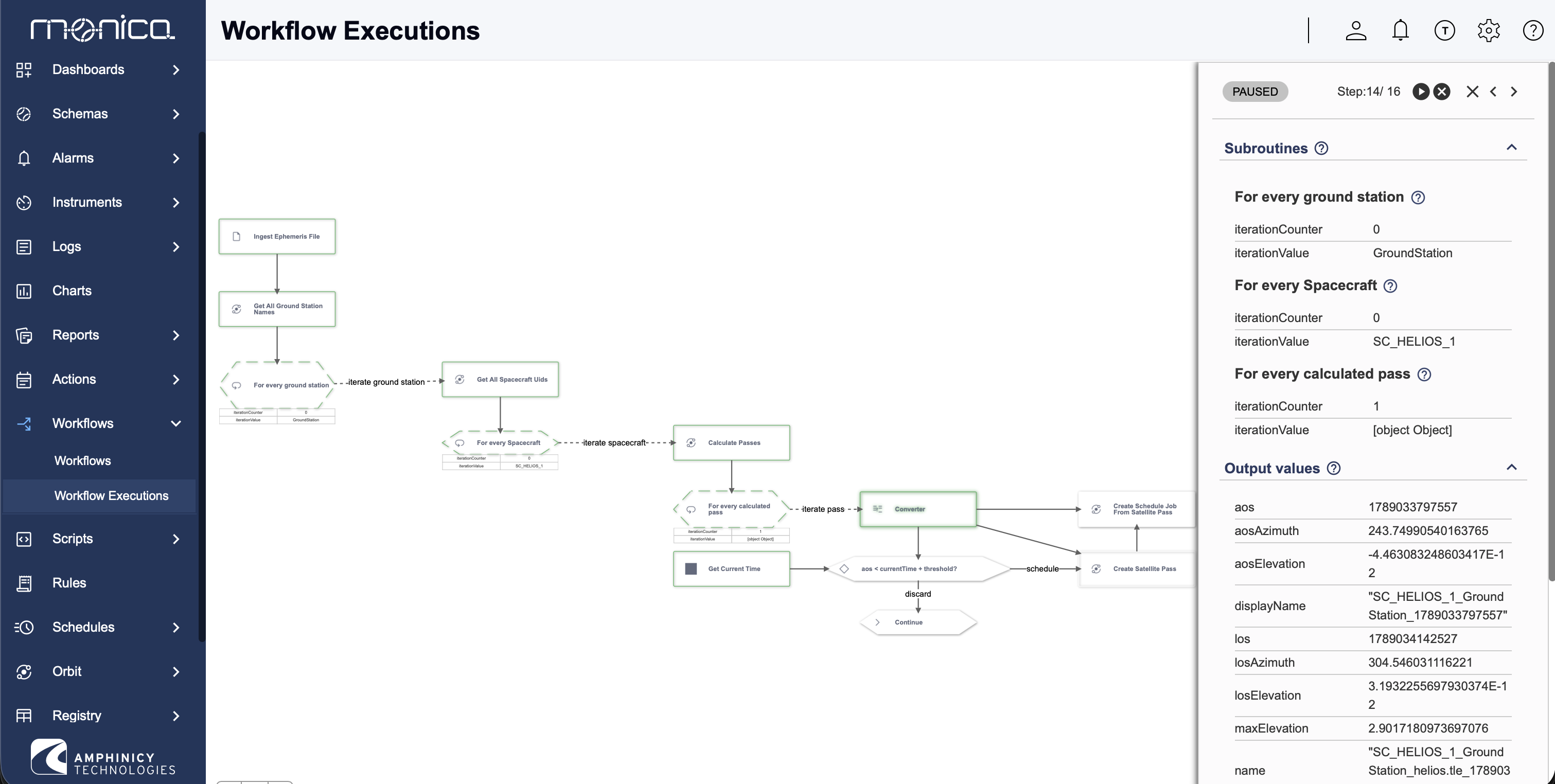
The Workflow Editor follows the same principles as the existing Schema Editor and is intended to be familiar to existing Monica users. The module also includes a Workflow Inspector with debugging support, allowing users to inspect executions, pause a workflow, step over individual steps, and examine variables and execution state.
Alarms, Logs and TSDB
In Monica M&C 7, TimescaleDB was optional and used only for parameter values selected for time-series storage. Alarm and log data remained in the main application database. While functional, this meant that high-volume, time-based operational data was stored outside the database structure best suited to it.
In Monica M&C 8, alarms and logs are stored in the time-series database. TimescaleDB is therefore now a required part of a Monica installation. It is deployed as a PostgreSQL extension and can run on an existing PostgreSQL server, so introducing it does not require a separate database platform or a significant additional operational footprint.
Moving alarms and logs to TimescaleDB improves the handling of continuously growing operational history and enables time-series-specific data management. This includes configurable retention policies, efficient time-based queries, and aggregation of older data for long-term analysis. TimescaleDB retention policies can automatically remove old raw data on a defined schedule, while continuous aggregates can retain summarised historical data after the detailed records have been removed.
As a result, parameter values, alarms, and logs now use a common time-series storage foundation, improving scalability and providing a more consistent basis for operational history, analysis, and monitoring.
A new Alarm Definition concept has been introduced to provide a clearer, centralised model for alarms.
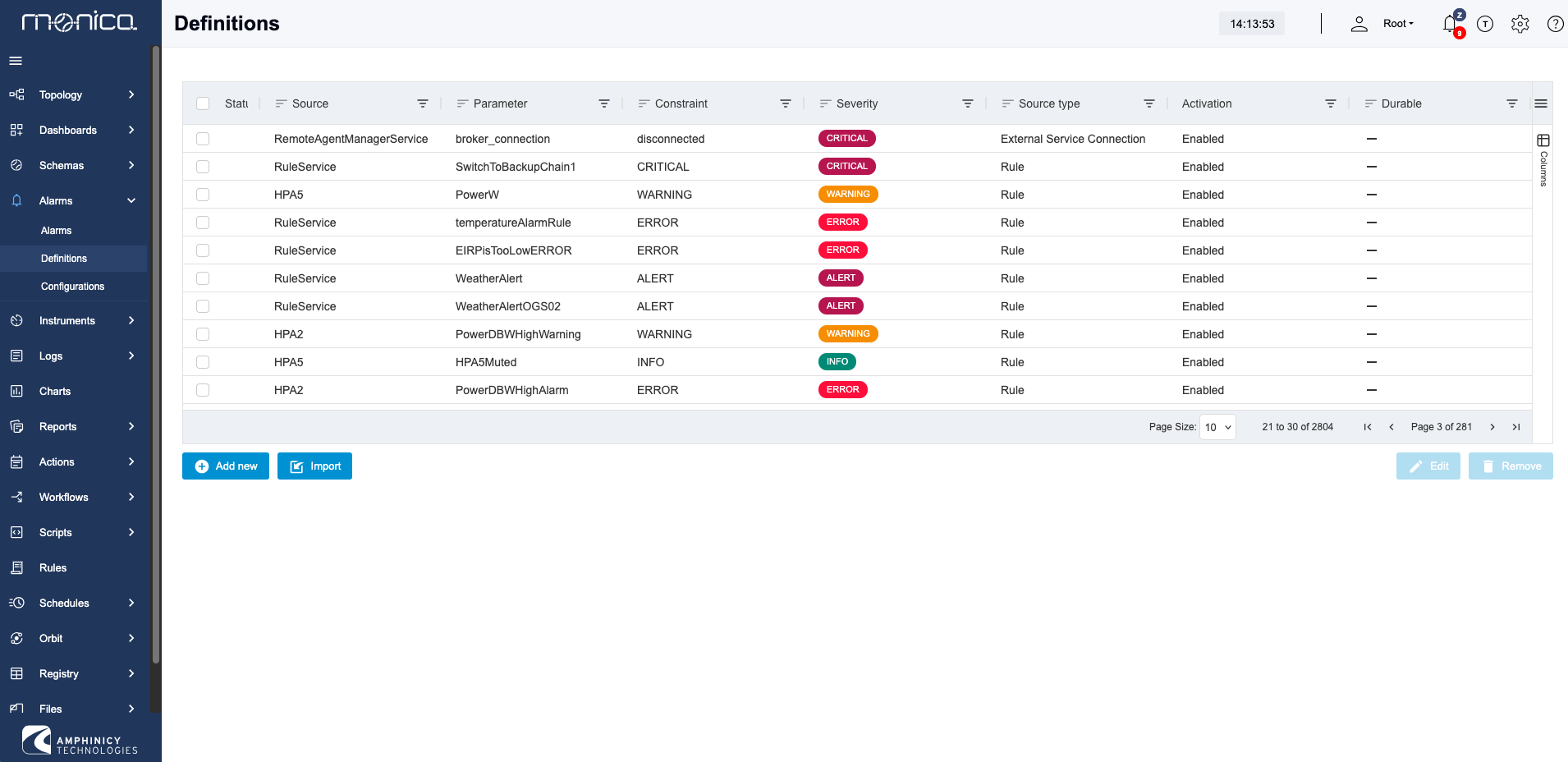
Alarm Definitions are reusable templates that describe the alarms the system can raise. They provide a common abstraction over parameter constraints and alarm rules, bringing both mechanisms into a single, consolidated view of all possible alarms in the system.
Each Alarm Definition acts as a blueprint for alarm instances using which alarm instances can be raised or cleared. This separates the reusable definition of an alarm from its runtime state and occurrences.
Topology
Topology is a new configurable UI widget for navigating the Monica M&C resource hierarchy. A topology view can display the complete hierarchy or a selected part of it, including Tenants, Instrument Groups, Instruments, and individual parameters.
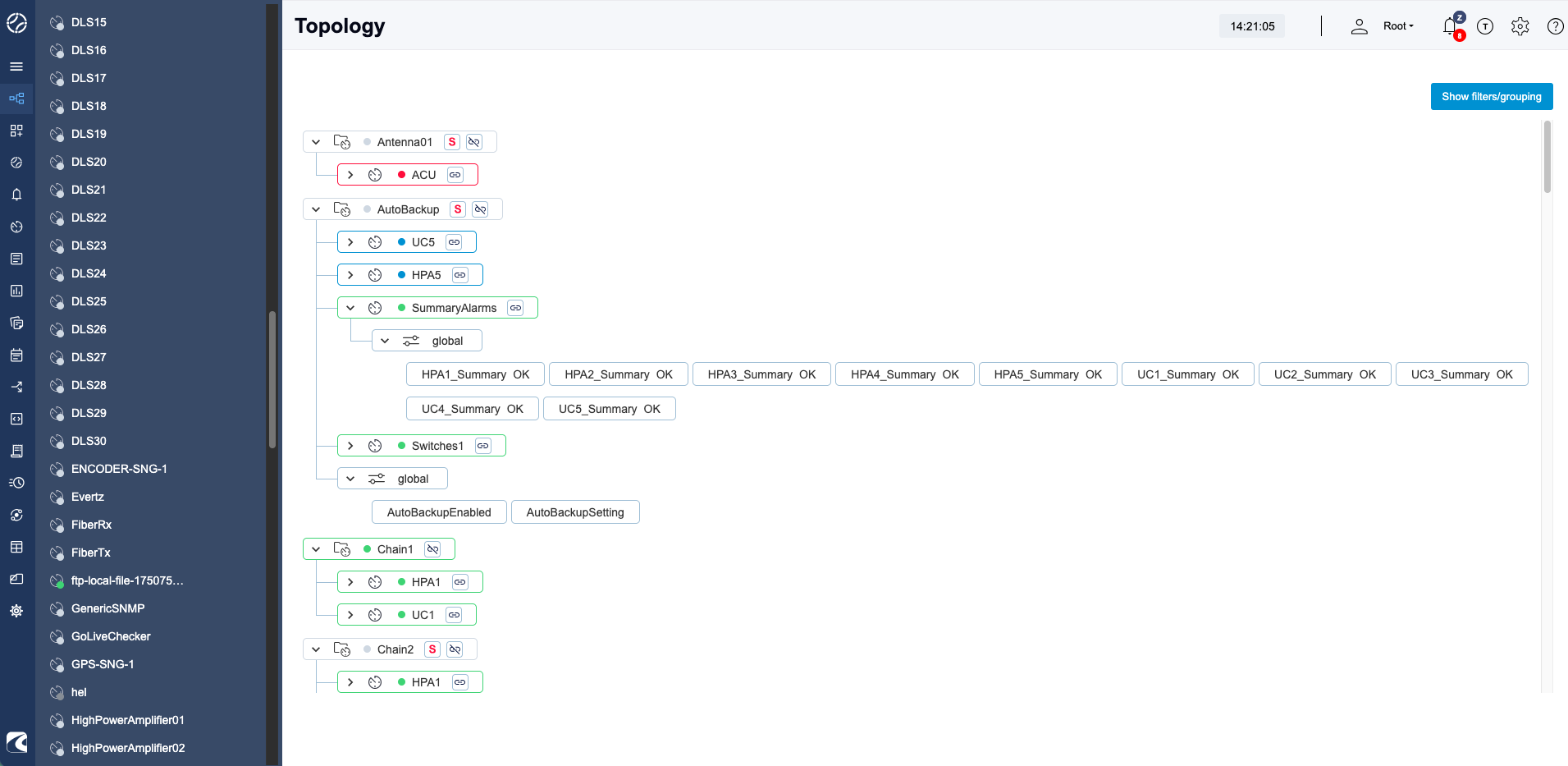
Each displayed element provides direct access to its details. Operators can open an Instrument or parameter from the topology and use common quick actions where applicable, such as changing an Instrument mode or setting and fetching parameter values. This provides a fast route from a high-level system view to an operational resource without requiring users to navigate through multiple configuration screens.
Topology views support filtering and grouping, allowing the displayed resource set to be tailored to a specific operational need. For example, a view can show only selected Instruments and group them by an arbitrary property such as IP address, port, site, subsystem, or another configured attribute. Hierarchical grouping and drill-down navigation are useful for keeping large monitoring and control structures manageable while preserving access to detailed resource information.
Multiple topology views can be configured and saved. They can be added to dashboards as widgets or exposed through a secondary main-menu structure, providing easy navigation from across the application.
Topology is also useful where manually maintained graphical schemas would be costly to create or difficult to use. For installations with a large number of Instruments, an automatically generated hierarchical view can provide a practical alternative: it reflects the existing Monica M&C model, adapts as the hierarchy changes, and remains usable when a manually drawn schema would become too large for a single screen.
Scheduler and Orbit module
Monica M&C 8 introduces several Scheduler and Orbit module improvements aimed at simplifying satellite-pass planning and execution.
Scheduled jobs and associated satellite passes can now include a PreStart trigger in addition to the existing Start and End triggers. This supports the common three-stage pass model: a pre-pass phase for system configuration and readiness checks, the pass itself for tracking and operations, and a post-pass phase for cleanup and preparation for subsequent passes. Each phase can invoke the relevant Monica Actions.
The Orbit module now supports the CCSDS Simple Schedule File format as an additional Orbit-file type. Unlike ephemeris formats, this file type is used to represent planned satellite-pass schedules. Passes imported from a schedule file can be inspected in Monica and scheduled manually or automatically.
A timeline view has been added to the Passes screen. It follows the same general concept as the Scheduler timeline, but is tailored to the representation of satellite passes, making it easier to review pass timing, duration, overlap, and planned activity across the available scheduling period.
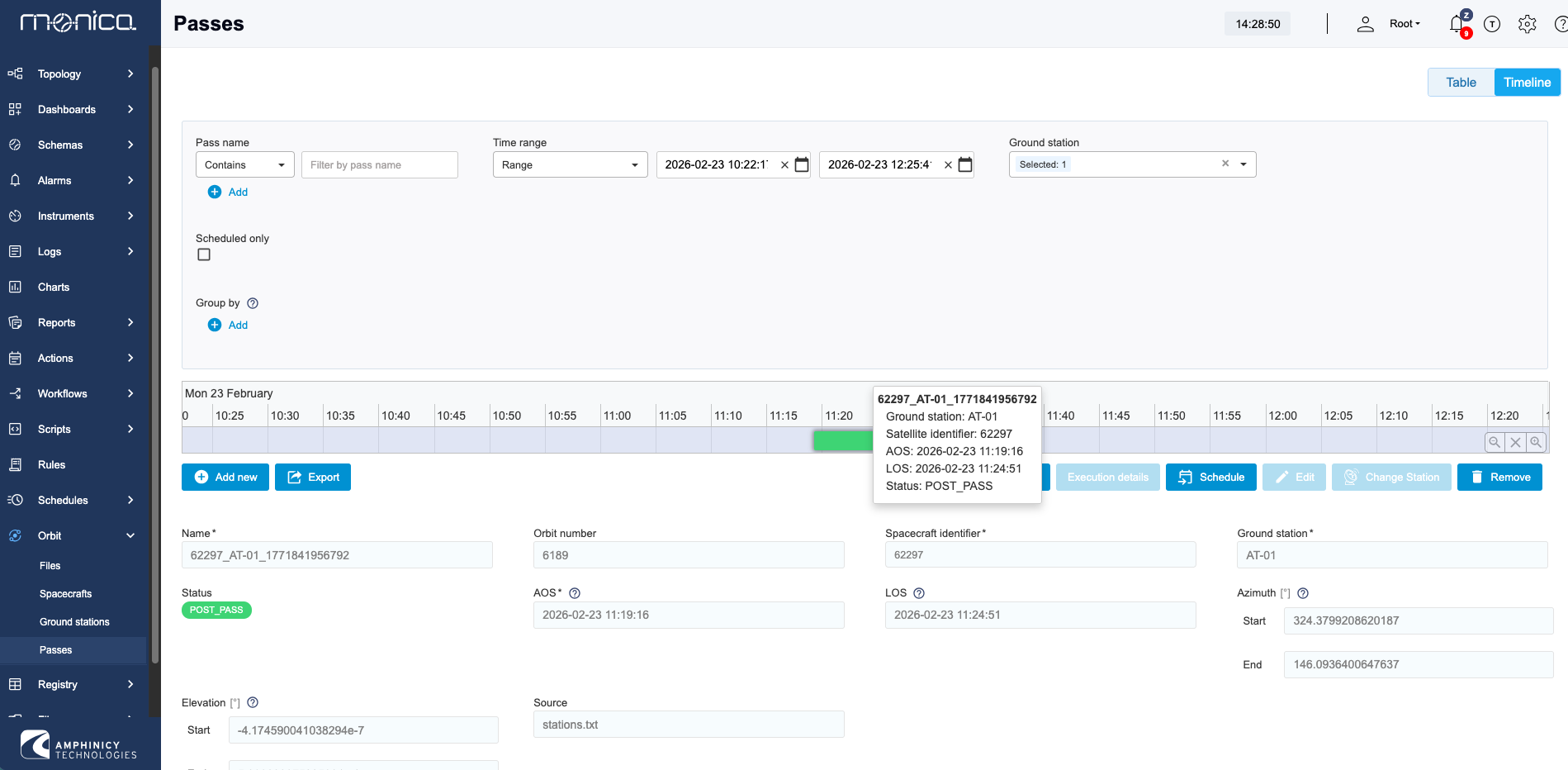
Monica 8 also introduces a Spacecraft resource and corresponding menu entry. Spacecraft can be managed independently, with their NORAD and COSPAR identifiers and associated Orbit files maintained in one place. Spacecraft and Ground Stations can additionally be assigned arbitrary Capabilities. These capabilities can be used when evaluating passes to dynamically identify valid Spacecraft–Ground Station combinations or exclude combinations that are not operationally supported.
Orbit files are now managed through the File Manager module. They therefore inherit its file-management features, including configurable retention durations.
The release also adds orbit-file conversion functions, available through the Scripting module. OEM data can be converted into time-tagged azimuth/elevation pairs or OEM blocks, supporting integration with Antenna Control Units that do not accept OEM input directly. CCSDS defines OEM as an orbit-data format containing time-tagged state vectors, including position and velocity, for a spacecraft; it is widely used for transferring spacecraft ephemeris data between systems.
Finally, scheduling can now be enabled or disabled for an individual Ground Station or Antenna. Previously, this control was available only globally. This makes it possible to temporarily exclude a specific station or antenna from scheduling without affecting the remaining operational infrastructure.
Deployment automation
Monica M&C 8 adds official Ansible support alongside the existing Bash installation scripts. This is particularly useful for HA and clustered deployments, where Monica must be installed and configured on multiple nodes and those nodes must be registered in a cluster.
Previously, multi-node installation required operators to perform steps sequentially on individual servers. Ansible allows the deployment to be defined centrally and executed remotely against all target nodes, making installation and cluster setup more repeatable and reducing manual coordination. Ansible inventories provide the central list and grouping of managed hosts used by an automation run.
Monica 8 also introduces an official way to convert System Exports and Bundles into RPM or DEB configuration packages. These packages can be installed through the Ansible deployment and contain the tailored configuration for a Monica system.
Using standard operating-system packages improves configuration management: deployments can install a defined configuration version, and administrators can query the configuration packages installed on each server using normal RPM or DEB tooling. Ansible can manage packages through the host’s native package manager.
UI improvements
Monica M&C 8 refreshes both the light and dark UI themes. The updated visual design modernises the interface while preserving the layout, terminology, and interaction patterns familiar to existing users.
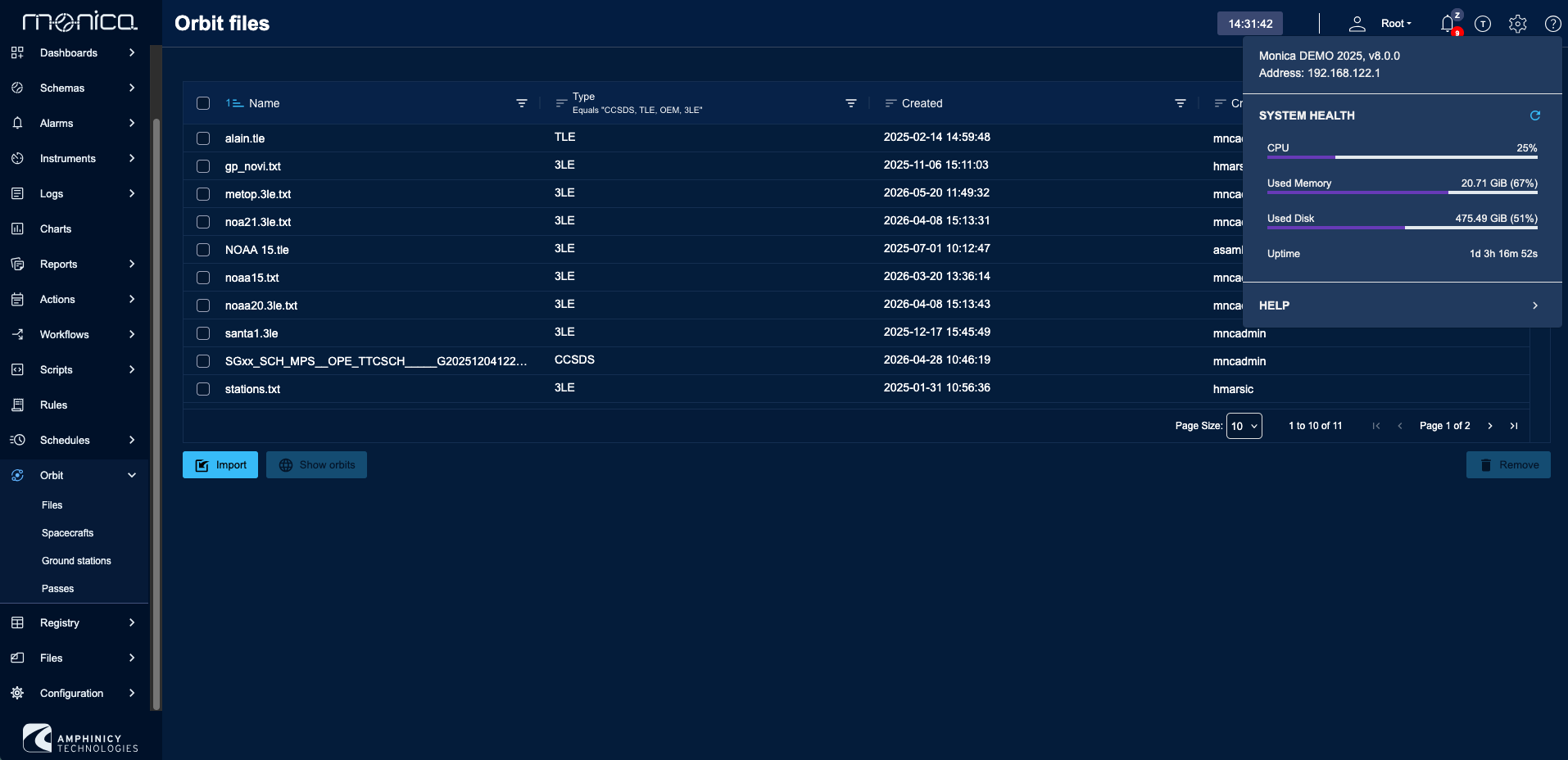
The table component has been replaced with a more modern library. Since tables are used throughout Monica for configuration, monitoring, logs, alarms, scheduling, and other operational data, this improves the usability and consistency of a large part of the application.
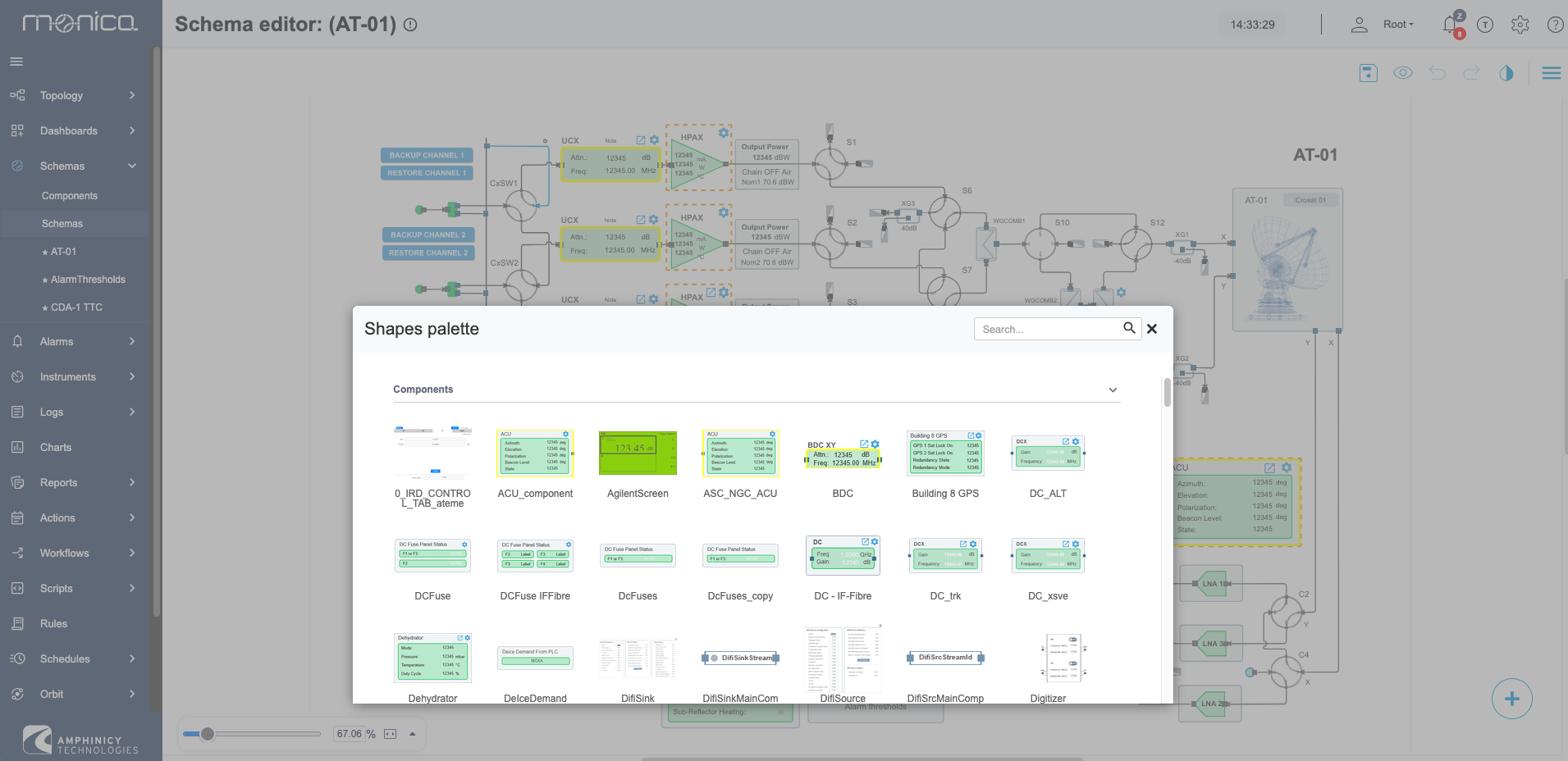
The Schema Editor has also received a range of UI and usability improvements. These changes reduce friction when creating and editing schemas, making it easier to arrange elements and work with larger diagrams.
Driver improvements
Support has been added for UDP and TCP streaming protocols with dynamic message sizes.
XML unpacking is now available alongside the existing JSON unpacking option.
The unpacking policy section, used to extract data from complex responses, has been redesigned around a new Transformation Chain concept. A transformation chain defines an ordered set of steps that transform incoming data into usable engineering values. Available transformation steps include: literal, regex-match, regex-replace, script, jsonpath, xpath, json-flatten, xml-flatten, xml-to-json, and json-wrap.
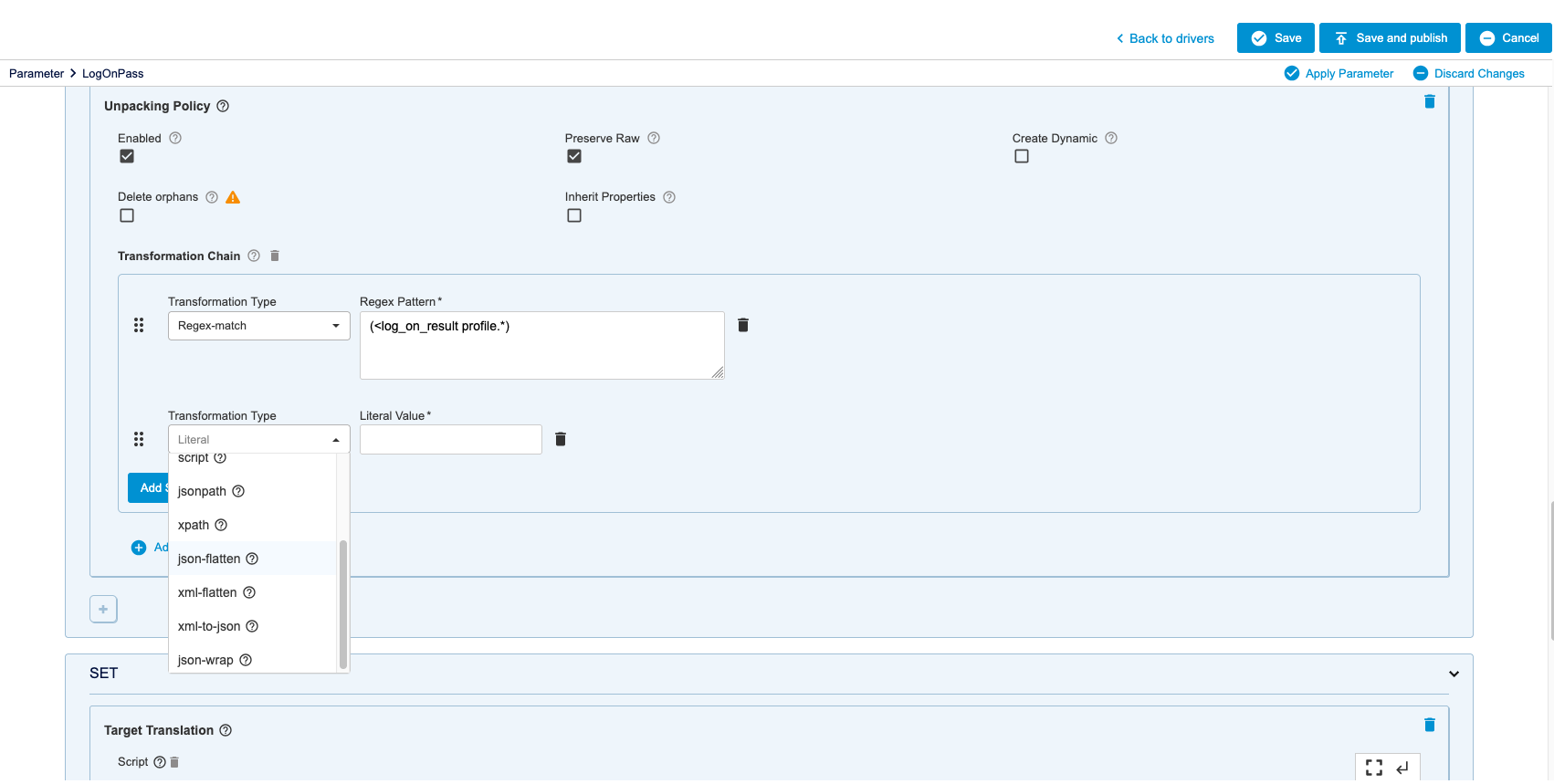
Backward compatibility is maintained: existing drivers are automatically migrated to the new unpacking structure.
Tech stack
The technology stack has been refreshed to the latest stable LTS versions of all core services, frameworks, and major libraries used by the platform.
| Component | v7.4 version | v8.0 version |
|---|---|---|
| Ubuntu | 22/24 LTS | 22/24/26 LTS |
| RHEL | 8 | 8/9 |
| WildFly | 31 | 41 |
| PostgreSQL | 16.2 | 18 |
| TimescaleDB | 2.14+ | 2.25 |
| OpenJDK | 17 LTS | 25 LTS |
| Jakarta EE | 10 | 11 |
| Angular | 17 | 21 |
| Quarkus | 3.8 | 3.38 |
Performance improvements
Performance improvements in this release focus on two main areas: startup time and polling throughput.
Boot time has been significantly reduced, with the platform now starting up 45% faster than version 7.
Polling throughput has increased by approximately 20% compared with version 7, allowing a single server to monitor hundreds of instruments more efficiently.
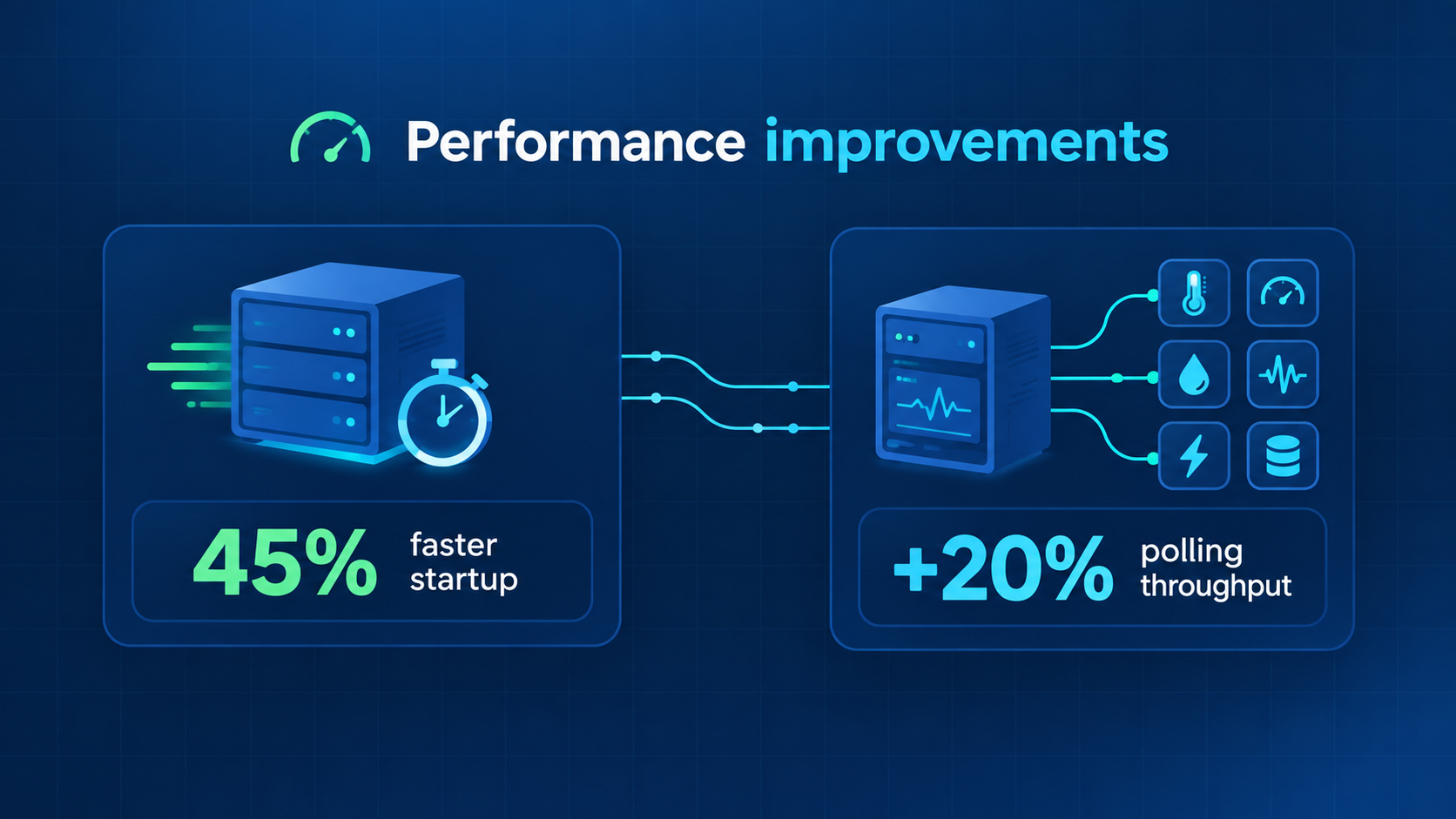
Performance has also improved across many REST APIs and throughout the GUI, supported by the refreshed technology stack.
Horizontal scalability remains available through active-active high availability (HA) deployments.
New dashboard widgets
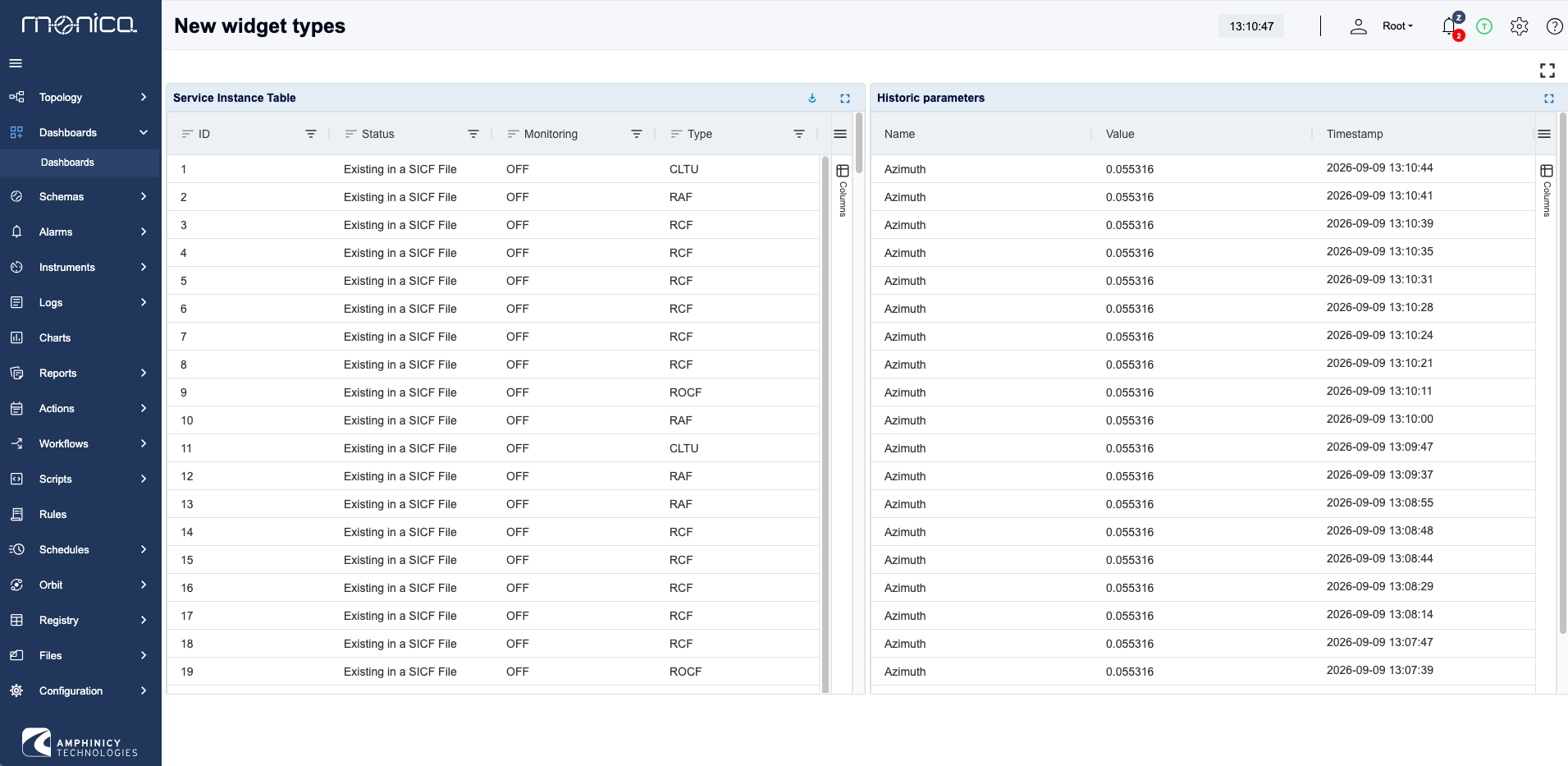
Two new dashboard widgets have been added for working with tabular parameter data.
Table Parameter Widget - displays a single parameter of TABLE type in a fully configurable widget, enabling dashboard-based monitoring and control of complex tables provided by a driver.
Tabular Historic Parameter Widget - presents TSDB history together with live updates in tabular form, with each row representing a single historical data point. This makes it possible to inspect historic values directly from a dashboard without first creating a chart.
Other improvements
This release also introduces several smaller but valuable improvements across monitoring, connectivity, reporting, backup, simulation, and deployment operations.
Delta Constraint - a new built-in driver constraint type that raises an alarm when a parameter value changes too quickly in either direction.
Range-Based Enums - alongside the existing Predefined Values option, Predefined Ranges can map a range of incoming numeric values to a single enumeration value.
Request-Scoped TCP Connections - TCP connections can now be established only when sending a command or performing a synchronous GET request. This is useful for instruments that limit the number of simultaneous connections on specific ports, as the connection remains open only while the request is in progress.
New Reporting Formats - reports can now be exported in RTF, TXT, and CSV formats, in addition to the previously available formats.
Backup and Restore with pgBackRest - a standardized procedure is now available for full and incremental data backup and restore.
Configurable Connection Alarm Severity - the severity of connection alarms is now configurable. The default is now CRITICAL, making it easier to distinguish connection issues from standard alarms.
External Simulations - an instrument can be marked as running in simulated mode while remaining connected to an external IP address and port.
WildFly Configuration Checker - a new tool verifies common WildFly configuration settings required for reliable Monica M&C operation.
Road ahead
We are already working on version 8.1 while actively deploying version 8.0 to customers worldwide.
Get in touch
Stay tuned for further news, and feel free to request a demo of any of the new features introduced in version 8.0.